Daily Scripture
About
Words to brighten your day. Die Losungen, “The Word for Today” from Bible 2.0 and your own passage selections: Daily Scripture brings daily readings to your WordPress website. Choose a layout, adjust the type and check the preview. Texts stay local; the design fits your site.
Daily Scripture adds daily readings, selected Bible passages and personal dashboard widgets to your WordPress website. Choose your sources, shape the design and display readings with Gutenberg, shortcodes, Elementor or Bricks. Website features also work in Multisite, with an additional Network Admin reading view.
Version: 1.1.2 · Requires: WordPress 6.6+ / PHP 8.1+ · License: GPL-2.0-or-later
Download · User guide · Deutsch
Contents
- At a glance
- Installation and first verses
- Daily readings and Bible library
- Layouts and typography
- Editors, shortcodes and dashboard
- Data and settings transfer
- Updates and documentation
- Dashboard readings and color picker
- Settings at a glance
- FAQ
- Changelog
- Author and project
At a glance
- A daily reading, ready to display: official verse pairs from Die Losungen and Bible 2.0, downloaded as annual packages or uploaded manually.
- Your own passage selections: a separate local library with Luther 1912, Elberfelder 1905, Menge 1939 and Schlachter 1951.
- A design that fits: ten layouts, light and dark appearances, compact spacing, custom colors and a live preview at several widths.
- Balanced, readable type: one overall scale, plus optional expert sizes in px, em, rem, %, or CSS variables.
- At home in your editor: Gutenberg blocks, Elementor widgets and Bricks elements for both daily readings and selected passages; two shortcodes work without a builder.
- A small daily companion: a dashboard widget with personal size and spacing choices, source headings and the WordPress admin accent.
- Ready for another project: validated JSON settings transfer, local text storage and updates in the regular WordPress update system.
Installation and first verses
- Download the plugin ZIP from GitHub Releases.
- Install it through Plugins → Add Plugin → Upload Plugin and activate it.
- Open Daily Scripture → Data sources (data sources), check availability and import an official annual package. Manual upload is available too.
- Under Design, choose a layout, adjust the overall size and check the preview. Save with the button at the top.
- Add the Daily Scripture block, builder element or shortcode. For selected passages, install an edition under Bible library first.
WordPress 6.6+, PHP 8.1+ and DOM/XML are required. ZIP packages need ZipArchive. Elementor and Bricks are optional. The interface is available in English, German and formal German.
Daily readings and Bible library
Daily readings and your own passage selections are separate. The official Losungen pair stays together and unchanged; changing the local Bible edition does not rewrite it. Bible 2.0 uses the texts and notices supplied in its annual package.
The independent Bible library lets you select a translation, book, chapter and up to 50 verses within one chapter. Full texts are installed separately. Luther 1912, Elberfelder 1905 and Menge 1939 use the reviewed public-domain sources; the supplied Schlachter 1951 source is CC BY 4.0. Source and license notices remain accessible.
Bibleserver is used for reference links only. Its independently selected target translation changes the link destination, not the text displayed on your site.
Layouts and typography
Start with a layout and the overall size slider: heading, verse, reference, date and source notices stay in proportion. Choose standard or compact spacing, then light, dark, device-based or custom colors. Expert mode adds individual sizes and colors when you need them.
Existing CSS variables such as var(--text-xxl, 28px) are supported. Include a fallback: the isolated admin preview cannot read your theme or builder variables. Preview wide and narrow screens, then check the published page in your actual theme. Keep the verse central, with a clear heading and quieter reference and license text.
Editors, shortcodes and dashboard
Gutenberg keeps controls in the sidebar and shows a server-rendered preview. Blocks can inherit saved defaults or use their own titles and display options. Elementor and Bricks also offer native typography, color, border and spacing controls, including responsive settings.
Use [daily_scripture] for daily readings and [daily_scripture_passage] for a selected passage. The plugin’s Shortcodes page provides examples with copy buttons and all book codes.
Each dashboard user can choose compact spacing and a 14, 16 or 18 px verse size under Display options. These preferences affect only that user on that site. Source headings and the default date format come from the site settings.
Data and settings transfer
The data sources page summarizes the current and next year, with direct links to package selection or upload. Download failures distinguish timeouts, secure connections, HTTP responses and unsupported content; collapsed diagnostic codes can be copied. The design preview supports today, tomorrow or a custom date using local annual data, without downloading or saving anything.
Annual downloads are started by you. The source check shows available packages; it does not install the next year automatically. Import validates complete years and verse pairs before replacing local data. Install next year’s package in advance and refresh page or CDN caches at the daily changeover.
All managed text files stay under wp-content/uploads/daily-scripture/. JSON exports contain saved design or site settings, not Bible texts, annual packages, personal dashboard choices or builder styles. Imported settings appear in the form for review and apply only when saved. Include local text files in your normal website backup.
Updates and documentation
Updates come directly from the DECKERWEB repository on GitHub and appear in the regular WordPress plugin update system while Daily Scripture is active. Update through Plugins or Dashboard → Updates as usual; no additional updater plugin is needed. Automatic updates remain your choice.
The English guide, German guide and themed FAQs explain settings, sources and common problems. A local copy is included in the plugin. The admin footer links to the documentation and opens the changelog in a dialog. Cached update checks can delay a new offer by up to 30 minutes; a manual ZIP update is also available.
Dashboard readings and color picker
Define available readings in Daily Scripture → Dashboard readings: Die Losungen, Bible 2.0 and up to six passages from installed local Bible editions (up to 50 verses in one chapter). Save the website settings, then open Display options in the widget. Select one or more readings and use Move up / Move down to order them. Without JavaScript, numeric positions remain available. No configured readings produces a quiet notice; missing yearly data or an unavailable edition is reported per reading. Personal choices do not change website output. Full JSON settings exports include the reading definitions; design-only and older exports leave them unchanged. Install the required editions on the destination website before saving imported passage definitions.
The Network Admin widget uses a personally selected active website in the current network and visibly names it. When only the main website is active, it is used automatically. With multiple active websites or network activation, select the source website; save once after changing it to load its configured readings, then choose your personal selection. An unavailable previous website falls back with a notice. The network widget is available when the plugin is active on the main website or network-wide; activation only on a subsite does not load it in Network Admin. The website widget switch affects that website’s dashboard; the network reading view is independent. Website choices are paginated in groups of 50. No separate network Bible storage is created.
Color controls use the modern WordPress color picker in a WordPress modal, with direct hex entry and optional text-color inheritance. Changes remain in the form until you save the settings.
Network dashboard and page caches
The Network Admin widget reads the selected active website’s local texts and timezone. Its personal display options are separate from website dashboards. New websites initialize their own defaults and annual checks when the plugin is network active. Network activation is supported with the bundled Library 1.1.0, including first activation beside an older Library copy. Refresh full-page/CDN caches after midnight in each website’s timezone so daily readings stay current.
Settings at a glance
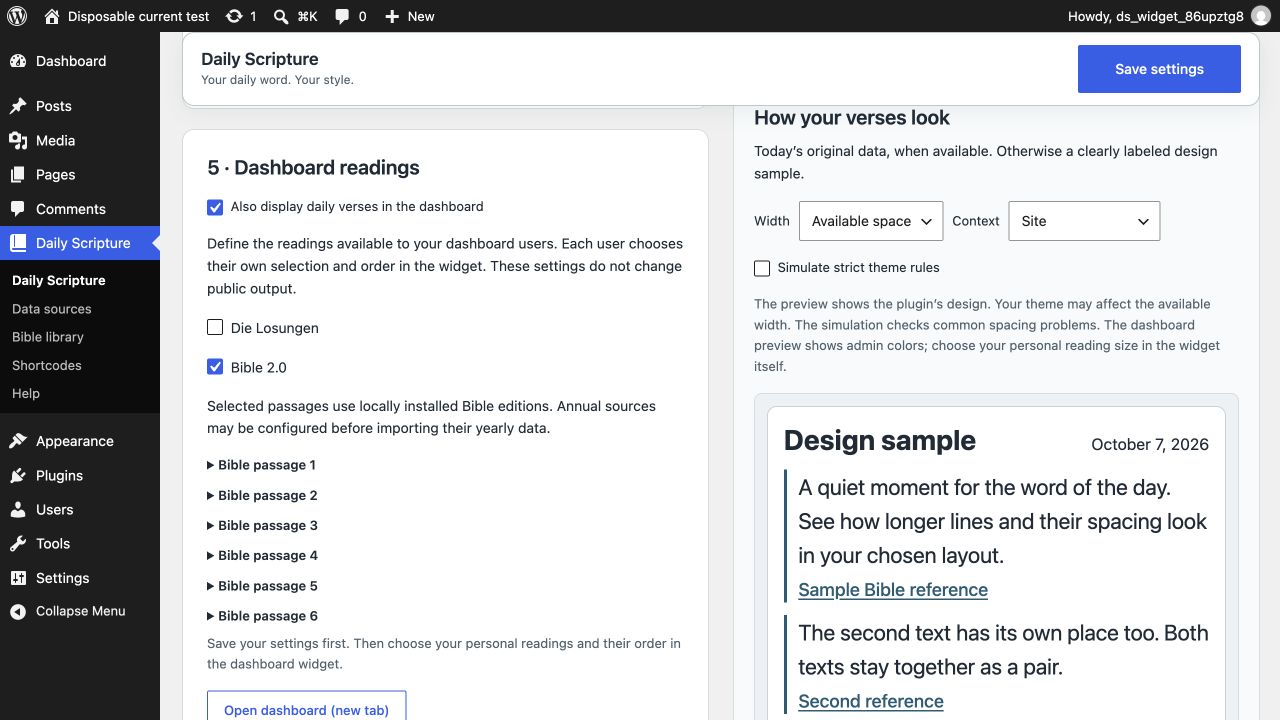
Dashboard sources and a clearly labelled design preview on a WordPress website.
For first network activation beside an older Library catalog that still blocks its card, open Network Admin → Plugins → Daily Scripture → Network Activate. The new Library takes over during that native activation. Hosts already running Library 1.1.0 offer activation directly in the catalog.
FAQ
Do I need Elementor or Bricks? No. Gutenberg, shortcodes and the dashboard widget work independently of either builder.
Are Bible texts included in the download? No. Install annual packages and Bible editions separately in the plugin. Observe the terms of each source.
Can I replace the official Losungen text with another translation? No. The official pair stays together and unchanged. Use the separate passage output for your own selections.
Is next year installed automatically? No. Check availability under Data sources and start the import yourself before the year changes.
Does a JSON import immediately change the website? No. Review it in the form and save to apply it. JSON contains settings, not stored Bible texts.
Why are yesterday’s verses still showing? Check the WordPress timezone, installed annual data and page/CDN caches. Cached pages need to refresh at the daily changeover.
How do updates work? The bundled deckerweb updater delivers public GitHub releases through regular WordPress updates. No additional updater plugin is required.
Changelog
1.1.2
- Fixed: Pinned deckerweb Updater 2.2.1 remains effective when another plugin loads an older updater first; update caches stay separate and are cleaned during uninstall.
1.1.1
- Improved: Updated shared plugin management and GitHub updates with deckerweb Library 1.1.0 and Updater V2 2.2.0, including clearer guidance when Git Updater is active.
- Misc: Refreshed component translations and documentation; WordPress 6.6 and PHP 8.1 remain the minimum requirements.
1.1.0
- New: Current/next-year overview for annual sources, temporary Today/Tomorrow/custom-date previews, and an expanded Site Health report with copyable support diagnostics under Help.
- Improved: Categorized download diagnostics with safe technical codes and a manual-copy fallback; isolated preview assets, more robust dialogs and Manrope lettering in the localized banners.
- Fixed: Losungen downloads can retry a missing-issuer certificate error with verified official intermediate certificates while keeping HTTPS verification enabled. Leading Losungen introduction markers are displayed in italics without visible slashes; wording and stored originals remain unchanged.
- Misc: Bundled deckerweb Library 1.1.0; unchanged Updater V2 2.1.0. Requires PHP 8.1 or later; WordPress 6.6 remains the minimum. Updated English/German documentation and checks for single-site and Multisite installations.
1.0.1
- Fixed: Network activation is supported with the bundled Library 0.8.1, including first activation beside an older Library copy.
1.0.0
- New: Personal dashboard source selection, multiple readings and ordering for WordPress websites, including Multisite; configured Bible passages and a selectable Network Admin source website.
- Improved: Modern WordPress color modal, dedicated dashboard settings and more readable widget spacing.
- Fixed: Stricter bulk-update package checks and isolated Multisite data cleanup; settings are retained by default.
- Misc: English interface and informal/formal German; updated documentation and local update artwork.
0.17.0
Unreleased intermediate version; included in version 1.0.0.
- New: Read-only Site Health check for annual data readiness and a compact diagnostic report.
0.16.4
- New: Shows local icons and localized banners in WordPress update offers and version details.
Author and project
Built by David Decker – DECKERWEB to give daily Bible readings a readable place on church, client and personal websites.
Have an idea or found a problem? Open an issue with plugin, WordPress and PHP versions, the affected editor and steps to reproduce it.
Report vulnerabilities privately through the security policy. Support: Ko-fi, Buy Me a Coffee, PayPal.
Plugin code is licensed under GPL-2.0-or-later. Bible texts and annual packages have separate terms. © 2026 David Decker – DECKERWEB · License
Shared components: deckerweb Library 1.1.0 and Updater 2.2.0, David Decker – DECKERWEB, GPL-2.0-or-later. Provenance and behavior: Components.
Banner typeface: Manrope, Copyright 2018 The Manrope Project Authors, SIL Open Font License 1.1. SVG banners use outlined lettering with no embedded raster images or external font resources.
Leading /…:/ introduction markers in Die Losungen are displayed in italics without visible slashes; wording and stored originals remain unchanged. Help → Support diagnostics offers a copyable local technical report. The same information appears under Tools → Site Health → Info: component versions, installation mode, extensions, installed years and safe codes from source checks still in the temporary cache. No new connection is tested and nothing is sent automatically. Since WordPress 6.9, the native Command Palette automatically includes accessible plugin menus; no extra Daily Scripture commands are registered. WordPress 6.6–6.8 retains the regular plugin menus.